
For English learners
Hints first.
You fix it.
Hintless underlines common grammar and spelling mistakes as you write. Click one to see why it's wrong. The answer stays hidden until you ask, so next time you don't need it.
Free · No account · Runs on your device
Hintless is a browser extension: open this page on a computer to install it.
Try it: click an underlined word, then fix it yourself.
Built to make itself unnecessary
-
Write as usual
In email, chats, forums and Google Docs. Hintless underlines the mistakes English learners make most.
-
Read the hint
Each explanation uses its own example, never the fix for your sentence, so you still have to think.
-
Fix it yourself
Hintless notices how you fixed it: from the underline alone, with the hint, or after showing the answer.
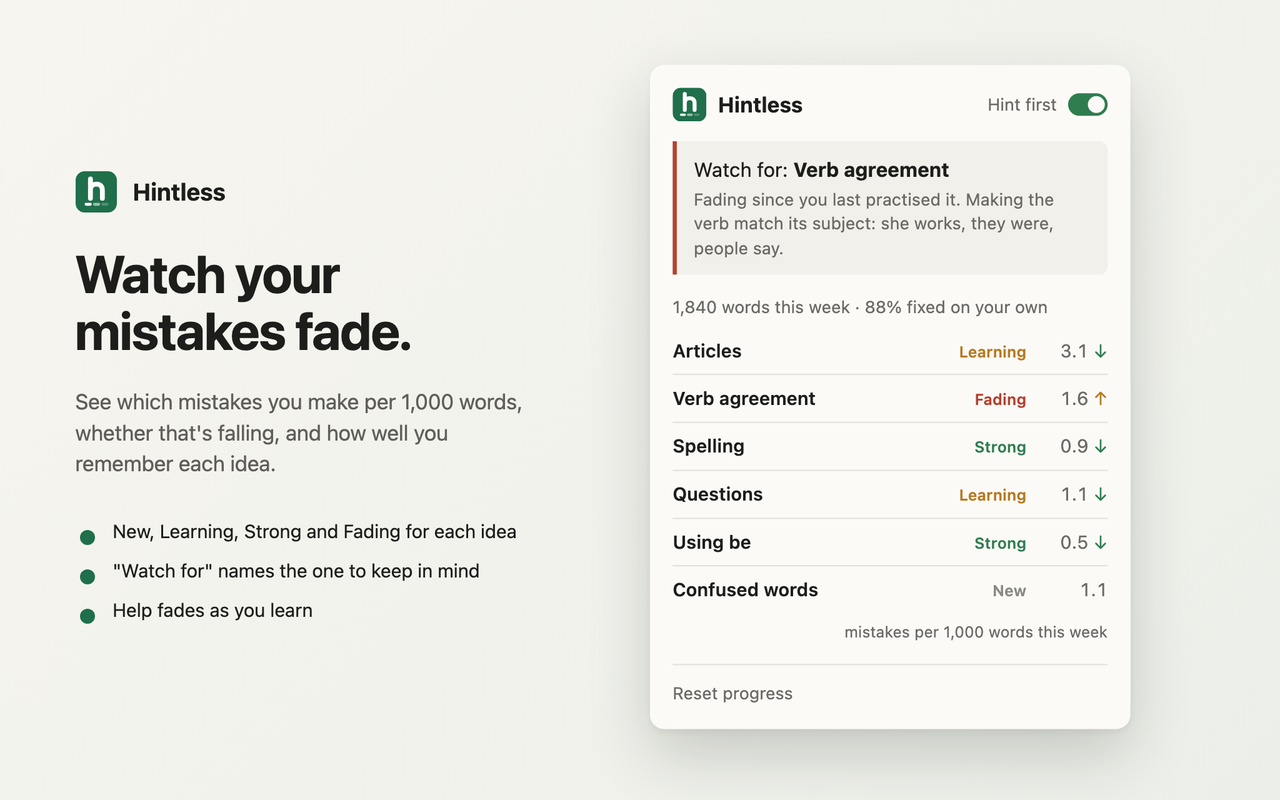
Watch your mistakes fade
Mistakes are grouped into about ten ideas, like articles, verb agreement and questions. For each one, see how often you make it per 1,000 words and how well you remember it.
- New, Learning, Strong and Fading for each idea
- "Watch for" names the one to keep in mind
- Help fades as you learn: strong ideas hide their hints
Private by design
Runs on your device. Your text is checked inside the extension and never sent anywhere.
No account, ads or analytics. The extension makes no network requests at all.
Your progress stays with you. Only counts and settings are saved, in your browser.
Teach English?
Hintless is free for your students today. We're thinking about a class view: the mistakes your students make most, and which ones are fading. Leave your email if you'd use it, and we'll ask what matters to you.
Questions
Is it free?
Yes. Everything in the extension today is free, with no account and no trial.
Does it work in Google Docs?
In Chrome and Edge, yes. Docs shows its own suggestions with the answers, so turn those off (Tools → Spelling and grammar) to get hints instead. Firefox can't support Google Docs yet.
Will it catch every mistake?
No. It focuses on common learner mistakes, like "I playing", "a advice" and "Do she like it?", and is tuned to avoid flagging correct English. When something is underlined, it's worth a look.
Can I use it on my phone?
Not yet. Hintless is an extension for Chrome, Edge and Firefox on a computer.
Which browsers?
Chrome, Edge, Brave and other Chromium browsers install it from the Chrome Web Store. Firefox users get it from Firefox Add-ons.